Managed File Transfer (MFT) is a secure, automated way to move data between systems, applications, devices, data centers and people. It is used for controlled file exchange with encryption, access controls, tracking and audit logs.

What Is Managed File Transfer?
Managed File Transfer (MFT) is a secure, automated way to move data between systems, applications, devices, data centers and people. It helps organizations exchange structured and unstructured files reliably, protect data in transit and at rest, track transfer activity and support compliance requirements. SEEBURGER BIS MFT adds centralized control, encryption, access controls, audit trails and near real-time tracking for enterprise file transfers across cloud, hybrid and on-premises environments.
Key takeaways
- MFT is used when file transfers need more security, automation, tracking and reliability than email, FTP or basic file-sharing services can provide.
- BIS MFT can schedule or trigger transfers, authenticate both parties, encrypt the transport medium and often the data itself, and record audit logs for visibility and compliance support.
- SEEBURGER supports multiple operating models for MFT, including on-premises, cloud, hybrid and iPaaS options, so organizations can decide which tasks to run themselves and which to delegate.
How does managed file transfer work?
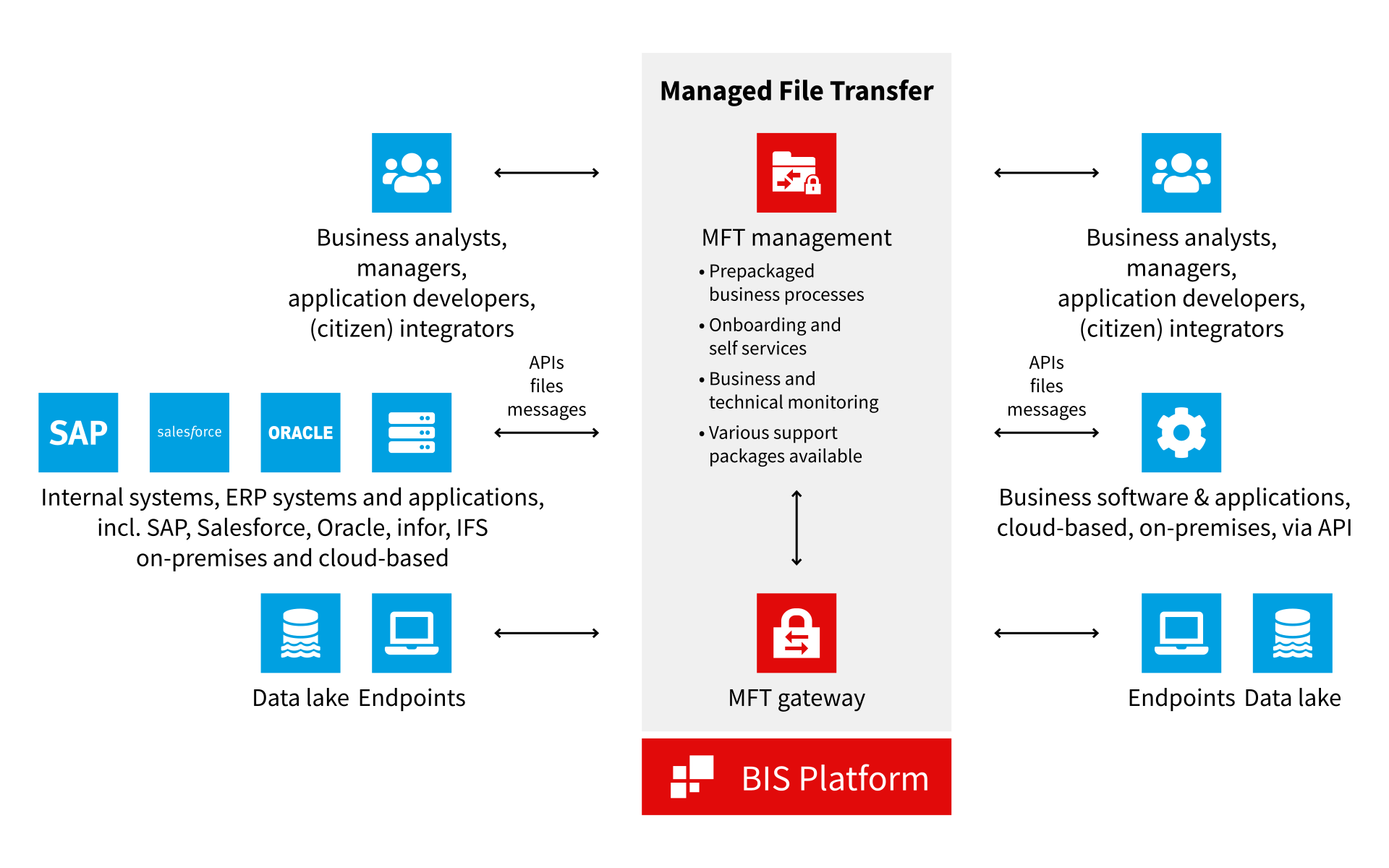
Managed file transfer sends data directly from endpoint to endpoint. Unlike email, where data may pass through several points of presence, MFT is designed for controlled, secure file exchange between authenticated parties.
BIS MFT supports endpoints such as systems, applications, IIoT devices, data lakes, blob storage and other environments. It can move data to or from cloud-based software, between data centers and, through the SEEBURGER Business Integration Suite, integrate with legacy systems.
MFT can transfer structured data as well as unstructured data such as video and audio. Transfers can be scheduled, triggered automatically as part of a process or initiated by a person. Before the transfer starts, both parties are authenticated to confirm they have permission to handle the data.
The transport medium and often the data itself are encrypted to help prevent unauthorized access or interception. BIS MFT provides near real-time tracking at the technical, process and business level and keeps audit logs, helping organizations reduce operational risk and improve transfer visibility.
What does a company need to use MFT?
Asecure data exchange solution needs high availability around the clock. For an on-premises installation, organizations need in-house staff resources and IT skills to operate and expand the environment over time.
Ongoing MFT work can include connecting new suppliers and trading partners, connecting additional systems for real-time processes, increasing security as compliance demands grow, expanding data capacity as digitalization intensifies and migrating connections when a core system such as an ERP system changes.
SEEBURGER also offers hosted managed file transfer services from the SEEBURGER Cloud. For organizations that want cloud managed file transfer while keeping selected sensitive data or IT tasks in house, SEEBURGER iPaaS allows teams to decide which tasks remain internal and which tasks are delegated. BIS MFT can be used in a public cloud, on-premises, in a hybrid setup or in the cloud.
Powered by BIS, SEEBURGER MFT capabilities help securely transfer files and connect and convert data as business needs and systems change through growth, merger or acquisition.
What are the benefits of managed file transfer?
Security
Efficiency
Compliance support
Scalability
What are alternatives to managed file transfer?
Common alternatives to MFT include FTP, SCP, SFTP and cloud-based file-sharing services. These options can be useful in specific situations, but they generally offer fewer enterprise-grade security, automation, prioritization, auditing or reporting capabilities than MFT.
| Alternative | What it is | How it compares with MFT |
| FTP | A standard protocol for transferring files between servers and clients. | FTP is simple and widely supported, but it lacks the security and automation features provided by BIS MFT. FTP sends messages on a first-come, first-served basis, while BIS MFT can prioritize messages that need to get through in near real time. |
| SCP | A secure copy protocol that uses SSH for encryption and authentication. | SCP supports secure file transfer but lacks advanced automation and the auditing and reporting needed for GDPR and SOX compliance. |
| SFTP | A secure file transfer protocol that uses SSH for encryption and authentication. | SFTP can include automation and auditing and is sometimes used within MFT. As a stand-alone method, it contains fewer automation and auditing capabilities than MFT. |
| Cloud-based file sharing | Services often used for human-to-human file transfers. | File-sharing services can be convenient, but they may be less suitable for large files, compliance-sensitive data, automation or system-to-system data exchange. |
What happens if managed file transfer fails?
BIS MFT places checkpoints at regular intervals in the data transfer process. If a transfer fails, checkpoint restart resends the data set from the checkpoint before the error occurred, supporting business continuity.
If a receiving endpoint fails, the smart retry function parks affected messages and regularly probes the defective connection until the endpoint responds again. It then resumes sending data to that endpoint, including the originally affected data.
High availability file transfer is important for uninterrupted business operations. BIS MFT supports active-active clustering and can be deployed from the fully managed SEEBURGER Cloud or as an integration platform as a service.
Why choose SEEBURGER Managed File Transfer?
SEEBURGER Managed File Transfer is designed for enterprise integration needs. With BIS MFT, organizations can transfer files and data securely and efficiently between systems, applications, devices and data centers.
Built-in encryption, non-repudiation, confidentiality and security help organizations send data in line with regulations and standards. BIS MFT also supports automation, prioritization and tracking at the technical, transport and message level. Data transfer automation and visibility are built in.
White Papers
SEEBURGER Managed File Transfer: A Technical Guide to Security, High Volume Data Transfer, and Endpoint Integration
Frequently asked questions about managed file transfer
What is managed file transfer?
How is managed file transfer different from FTP?
FTP is a standard file transfer protocol, but it lacks the security and automation features provided by BIS MFT. BIS MFT can also prioritize messages that need to get through in near real time, while FTP sends messages on a first-come, first-served basis.
Can MFT transfer both structured and unstructured data?
Yes. BIS MFT can transfer structured data as well as unstructured data such as video and audio.
Can MFT be automated?
Yes. With BIS MFT, transfers can be scheduled, triggered automatically as part of a process or initiated by a person.
What happens if a managed file transfer fails?
BIS MFT uses checkpoint restart to resend a data set from the checkpoint before the error occurred. If a receiving endpoint fails, smart retry parks affected messages, probes the connection and resumes sending when the endpoint responds again.
Which MFT operating models does SEEBURGER support?
SEEBURGER supports MFT in on-premises, cloud, hybrid and iPaaS operating models. Organizations can decide which tasks to keep in house and which tasks to delegate to SEEBURGER.
Why do organizations use MFT for compliance-sensitive data?
MFT provides encryption, access controls, audit logs and tracking of transfer activity at the business, process and technical level. These capabilities support visibility and compliance requirements for sensitive data exchange.

Related topics


White Papers

Managed File Transfer for Secure and Efficient Data Exchange – SEEBURGER MFT
Do you work in a sector with its own specific needs?
Take a look at the SEEBURGER range of industry-specific solutions