
Accounts Payable Workflow Automation
Beyond Compliance
Turn compliant inbound invoices into controlled workflows with automated routing, guided exception handling, and full operational visibility.
B2B e-invoicing mandates digitalize the invoice, not the process
B2B e-invoicing mandates are rapidly turning structured electronic invoicing from a voluntary efficiency initiative into a legal requirement. Companies must be able to exchange invoices through prescribed networks and platforms, support mandated formats, validate invoice data, and meet country-specific reporting and archiving obligations.
Accounts Payable teams utilize e-invoicing mandates to completely modernize their financial operations. By moving past standard compliance, they restructure how digital invoices are received, controlled, and integrated into existing systems. This approach successfully establishes the highly automated, efficient workflows these professionals require.
This means addressing several requirements beyond compliant invoice exchange:
- Configurable routing and approvals
Invoices must be routed to the right people based on defined rules, responsibilities, thresholds, and approval requirements. - Guided exception handling
Missing data, price or quantity discrepancies, and other deviations require structured clarification paths, clear ownership, and documented follow-up actions. - Business-user workspaces
Finance teams and approvers need intuitive access to invoices, supporting documents, tasks, comments, and available actions without relying on IT-oriented tools. - Operational visibility and control
Finance users and process owners need transparency into invoice status, ownership, required actions, processing times, overdue tasks, bottlenecks, and exception volumes. - Integrated and traceable processing
Invoice data, workflow results, approvals, and status changes must flow into ERP, finance, procurement, and archive systems without manual re-entry while remaining fully traceable.
Your shortcut to success:
Clear, concise insights at your fingertips, whenever you need them.
Turning compliance into AP automation
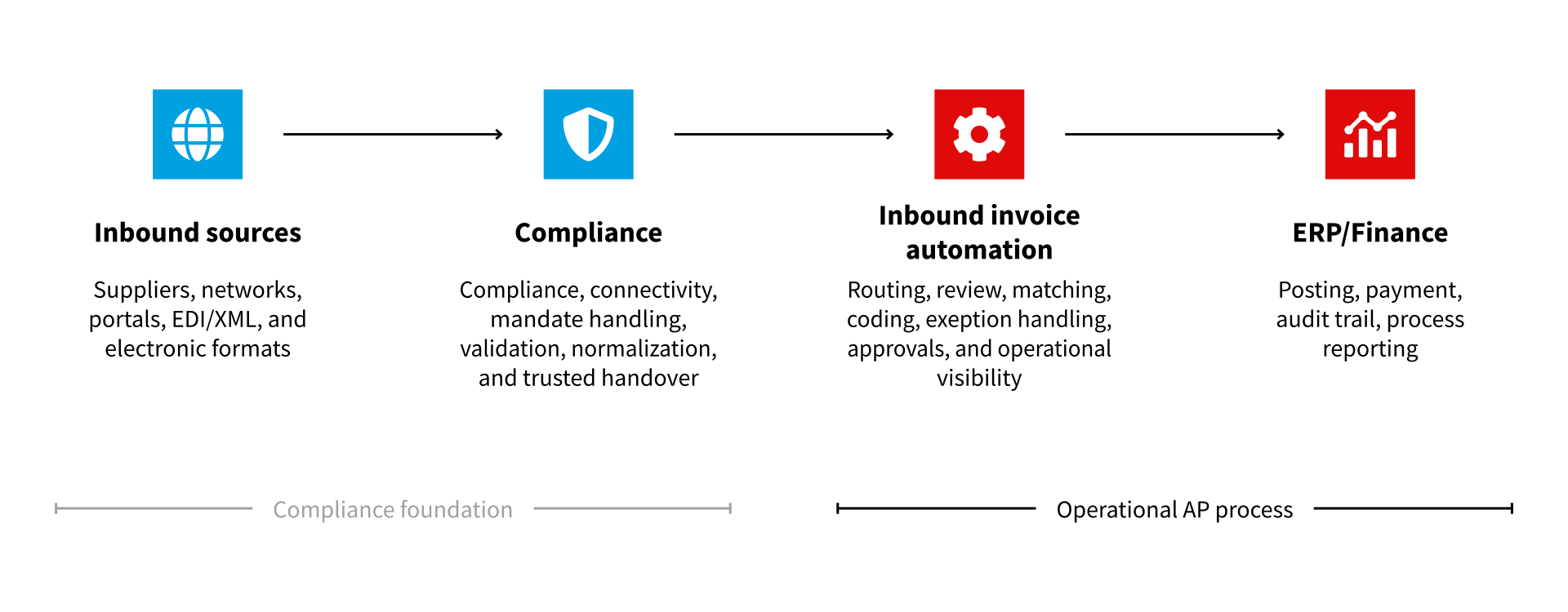
Finance professionals should not have to manage the complexity of e-invoicing networks and mandate handling. At the same time, the compliance layer should not determine who reviews, approves, codes, or clarifies an invoice. The value lies in the clean handover of trusted invoice data to an AP workflow operated and controlled by Finance.
| Layer | Primary responsibility | Business value for AP |
| Compliance | Manages compliant inbound invoice exchange, connectivity, validation, normalization, network or platform interaction, and trusted handover of invoice data. | A compliant, validated, and structured invoice data foundation for downstream processing. |
| AP automation | Manages the operational AP process, including review, enrichment, matching, coding, exception handling, approvals, task management, posting preparation, monitoring, and reporting. | A controlled invoice process with business-user workspaces, guided processing, operational visibility, and auditability. |
One comprehensive solution for your inbound invoices
One holistic e-invoicing solution, delivered through two complementary layers with clearly assigned responsibilities
Turn e-invoicing complexity into trusted invoice data
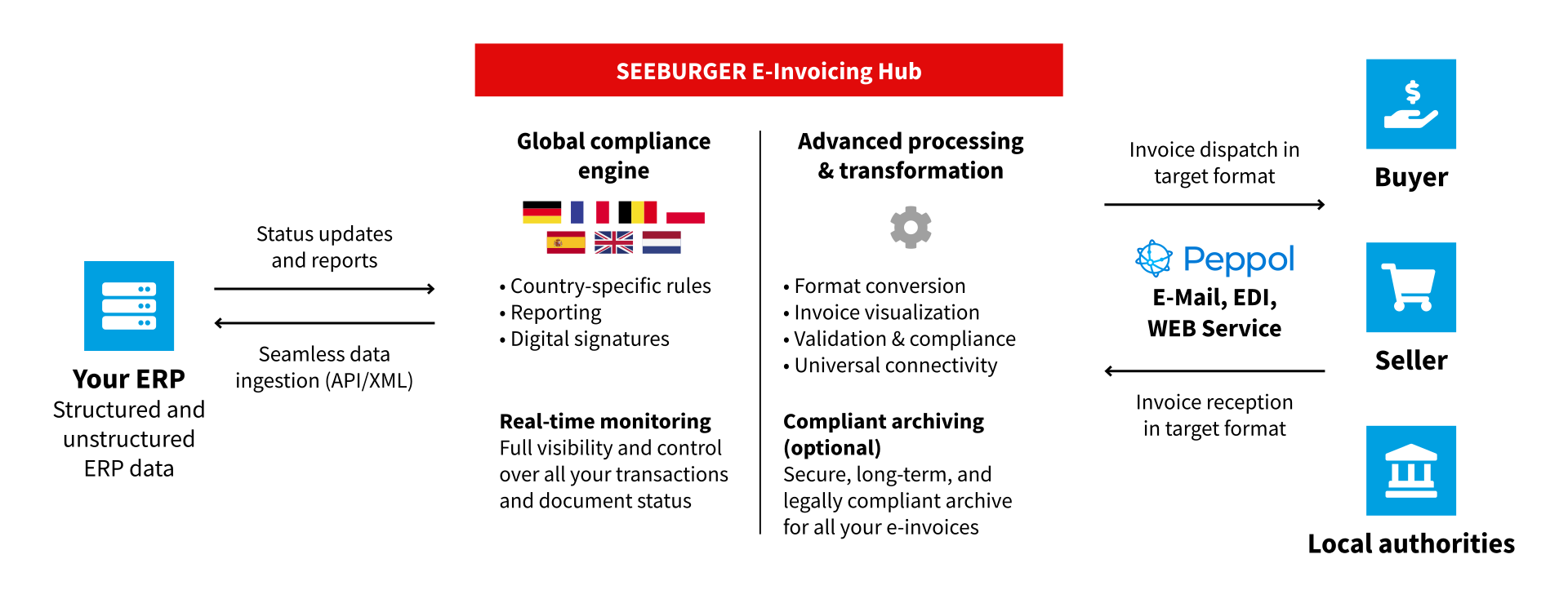
The compliance and transaction layer, delivered through the SEEBURGER E-Invoicing Hub, handles compliant inbound invoice exchange, connectivity, validation, normalization, government and network interaction, and the trusted handover of electronic invoices.
It provides Accounts Payable with a technically and legally prepared invoice data payload for downstream business processing, and helps organizations:
- Manage country-specific mandates, prescribed networks, platforms, and formats
- Validate and normalize incoming invoice data
- Centralize connectivity and regulatory interaction
- Make transmission, validation, and status information visible
- Hand over trusted invoice data to downstream ERP and finance processes
- Create a scalable foundation for additional countries, entities, and mandates
The result is a reliable compliance and transaction foundation that prepares inbound invoice data for the workflow and automation layer.
Turn trusted invoice data into controlled AP execution
The workflow and automation layer turns trusted invoice data into controlled, business-user-driven AP execution. It enables Finance teams to route and approve invoices through defined workflows, resolve exceptions with clear ownership and context, and manage work through intuitive invoice views, task queues, and operational visibility.
This layer helps organizations:
- Create controlled invoice workspaces for data, documents, tasks, comments, and actions
- Orchestrate routing, approvals, reassignment, and escalation paths
- Manage exceptions and clarification with clear ownership and business context
- Support matching, validation, and coding for PO and non-PO invoices
- Control tasks and workloads through queues, reminders, monitoring, and history
- Create operational transparency into status, bottlenecks, workloads, and open items
The result is a controlled AP process with less manual follow-up, faster exception resolution, clear operational visibility, and full traceability.
What keeps AP automation under control
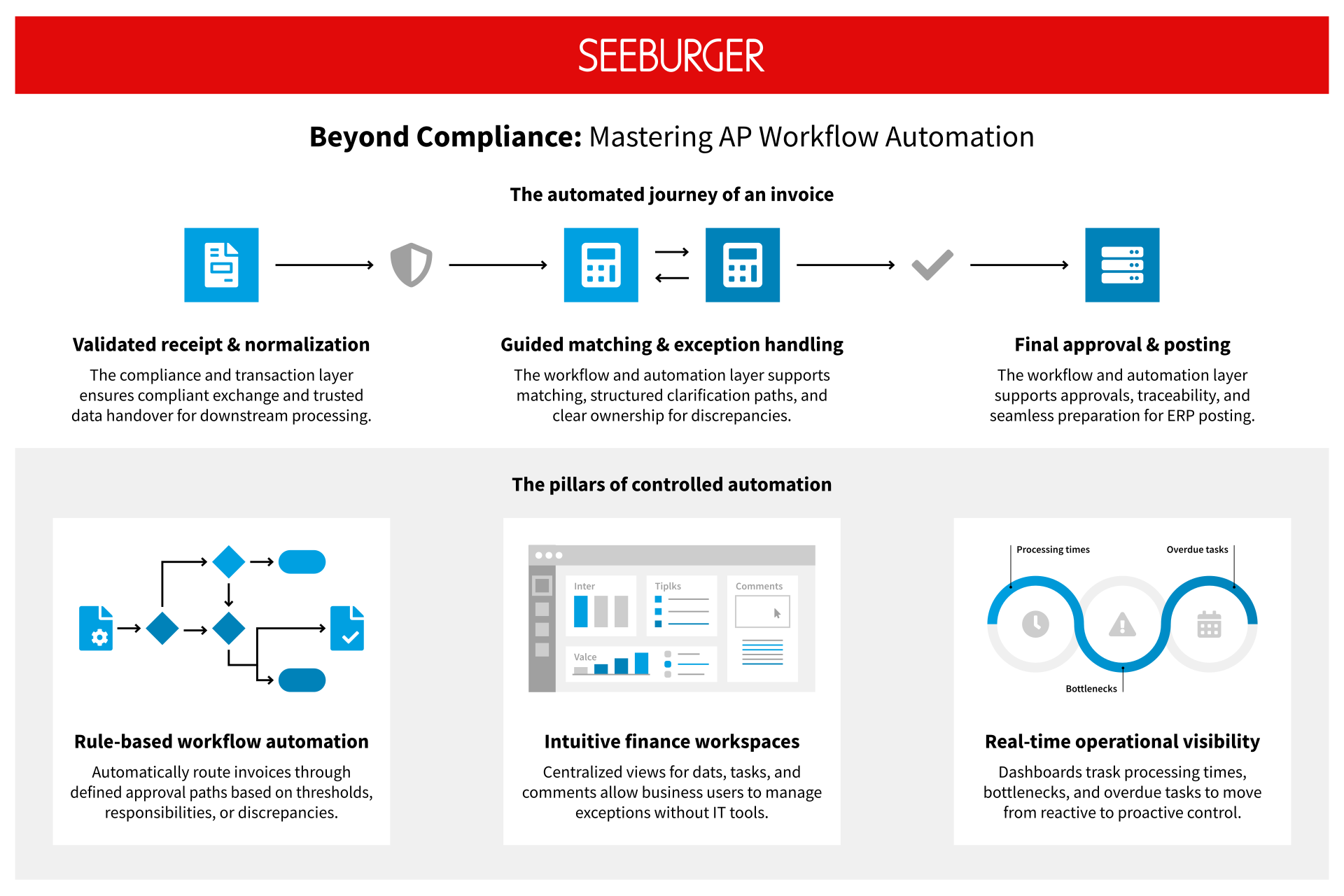
Rule-based workflows, intuitive Finance workspaces, and real-time operational visibility work together to reduce manual handoffs, guide users through exceptions, and give process owners the insight needed to keep invoices moving.

Rule-based workflow automation
Automatically routing invoices through defined approval paths based on thresholds, responsibilities, or discrepancies.

Intuitive finance
workspaces
Centralized views for data, tasks, and commitments allow business users to manage exceptions without IT tools.

Real-time
operational visibility
Dashboards track processing times, bottlenecks, and overdue tasks to move from reactive to proactive control.
The capabilities behind effective AP automation
Unclear responsibilities, manual handoffs, unresolved exceptions, and limited process visibility slow invoice processing and increase the effort required from Finance teams. Effective AP workflow automation replaces these operational gaps with defined process control, guided business-user interaction, and the visibility needed to move invoices efficiently from receipt through clarification, approval, and preparation for posting.
When invoices are forwarded manually, responsibility is difficult to control, and processing depends too heavily on individual knowledge. Invoices can be routed automatically through defined approval paths based on criteria such as invoice type, organizational responsibility, purchase order reference, approval requirements, or detected discrepancies.
This helps ensure that each invoice reaches the right person at the right time without relying on manual forwarding or individual process knowledge.
- Route invoices to the appropriate users or teams
- Support multi-step review and approval processes
- Manage responsibilities, reassignment, reminders, and escalations
- Distinguish routine cases from invoices requiring additional review
- Maintain a documented history of approvals and decisions
Standard cases can proceed with minimal intervention, while exceptions are directed into the relevant review or clarification path.
Missing information, price or quantity differences, and unclear ownership often push invoices into email chains and informal follow-up. This separates the clarification from the invoice and makes it difficult to see what is blocking progress.
Keeping exceptions connected to the invoice ensures that relevant data, documents, comments, and responsibilities remain available throughout the clarification process. This reduces disconnected follow-up, speeds up resolution, and preserves a traceable decision history.
Finance teams can therefore:
- Identify why an invoice cannot proceed
- Assign the issue to the appropriate business owner
- Provide the information required to resolve the exception
- Track open actions, reminders, and overdue tasks
- Return the invoice to the regular processing flow once the issue is resolved
Invoice automation must support the people who review, code, clarify, and approve invoices, not only the IT teams that operate the underlying integration environment.
Dedicated invoice views, task lists, and approval functions bring invoice data, source documents, status information, comments, responsibilities, and available actions together in the context of each task. This reduces system switches and gives Finance teams and business users a clear view of what needs to be done next.
This provides users with:
- A consolidated view of invoices and related information
- Clear ownership and visibility into the next required action
- Direct support for review, coding, clarification, and approval
- Fewer disconnected handoffs between email, spreadsheets, and business systems
- A consistent and traceable processing environment
Visibility into an individual invoice is not enough to manage Accounts Payable operations. Process owners also need to understand workloads, overdue tasks, recurring exceptions, processing times, and operational bottlenecks.
Inbound invoice automation solutions provide monitoring and reporting capabilities that can make the following information visible:
- Open, waiting, and overdue invoices
- Current task ownership and processing status
- Exception and clarification volumes
- Processing times and workflow history
- Workloads, queues, and escalation cases
- Automation and touchless-processing performance where applicable
- Underlying invoice details through operational drill-downs
This allows Finance teams to move from reactive follow-up to proactive process control. Instead of discovering delays only when suppliers or internal stakeholders escalate them, process owners can identify bottlenecks, prioritize work, and improve invoice processing based on operational data.
The process from compliant receipt to controlled AP execution
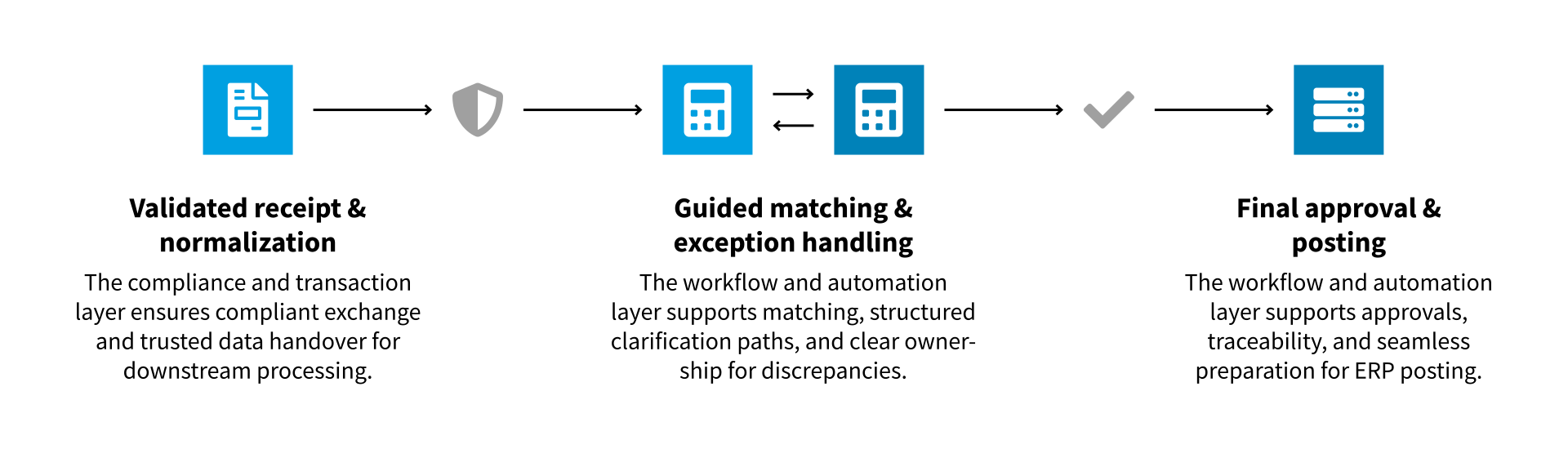
A connected inbound invoice process ensures that trusted data moves through the right reviews, decisions, and actions without losing context or visibility. Routine steps can proceed automatically, exceptions remain with the appropriate business users, and process owners can track progress from compliant receipt through posting preparation.
| Step | What happens in the process | How automation supports the step |
01 Receive and validate | The invoice enters through compliant electronic channels and is prepared for downstream processing. | Connectivity, technical validation, regulatory interoperability, and trusted handover through the E-Invoicing Hub. |
02 Normalize and hand over | Different electronic formats are converted into consistent, usable invoice information. | Format conversion, normalization, and structured transfer into the AP process. |
03 Review and enrich | Business users verify invoice values, check completeness, and add any required information. | Invoice workspaces, document views, and interactive processing functions. |
04 Match and code | PO invoices are compared with purchasing and receipt data, while non-PO invoices are coded and assigned. | Automated matching, coding support, and optional intelligent suggestions for non-PO invoices. |
05 Clarify exceptions | Missing information, discrepancies, or process blocks are assigned to the responsible user. | Guided exception workflows with invoice context, comments, documents, and clear ownership. |
06 Approve and prepare posting | Invoices move through the required approval steps and are prepared for posting and payment. | Role-based approvals, assignments, reminders, escalations, and a traceable decision history. |
07 Monitor and improve | Process owners track status, workload, delays, and recurring bottlenecks. | Task dashboards, process monitoring, reporting, drill-downs, and historical analysis. |
Choosing the right path for AP automation beyond compliance
The workflow and automation layer can be implemented through SEEBURGER Invoice Portal or SEEBURGER Purchase-to-Pay, depending on the organization’s application landscape and operating model. Both solutions address the same fundamental requirement: turning trusted inbound invoice data into controlled, transparent, and increasingly automated Accounts Payable processes.
They support the core capabilities of the layer, including invoice review, matching or coding, routing, approvals, exception handling, task management, status visibility, and auditability. The main difference lies in where the operational process is managed and how deeply it is embedded in the existing application landscape.
The choice therefore depends on where the workflow and automation layer should operate, which systems and users it must support, and how closely invoice processing should be integrated with the existing environment.
When SEEBURGER Invoice Portal
is the better fit
SEEBURGER Invoice Portal is particularly suitable when invoice processing needs to be managed through a central, web-based environment that extends across systems, organizational units, or ERP landscapes.
It is a strong fit when organizations need:
- One central invoice workspace for multiple entities or backend systems
- A consistent process across heterogeneous ERP and finance environments
- Centralized visibility into incoming invoices, tasks, responsibilities, and exceptions
- A business-user process that is not tied to one ERP interface
Its value lies in creating a unified operational process even when the surrounding system landscape is diverse.
When SEEBURGER Purchase-to-Pay
is the better fit
Choose SEEBURGER Purchase-to-Pay to embed invoice processing directly into SAP Procure-to-Pay. The SAP Add-On uses existing purchase orders, goods receipts, vendor data, approval structures, financial controls, and posting processes to enable seamless end-to-end AP automation without a separate platform.
- SAP is the strategic ERP and system of record
- Procurement and Finance processes run on SAP
- Purchase Orders and Goods Receipts should drive invoice automation
- AP users work within SAP-centric business processes
- SAP governance, controls, and approvals should be retained
- Deep integration with SAP master and transaction data is required
- The goal is a true end-to-end Purchase-to-Pay process
Using both solutions within one enterprise strategy
SEEBURGER Invoice Portal and SEEBURGER Purchase-to-Pay can form part of the same enterprise-wide invoice automation strategy when different parts of an organization operate under different system and process conditions.
Typical deployment scenarios include:
- Purchase-to-Pay for SAP-centric entities that require deeply integrated invoice processing based on SAP master data, purchase orders, receipts, workflows, and posting processes.
- Invoice Portal for heterogeneous or shared service environments spanning multiple entities, countries, ERP systems, or finance backends.
- A combined group-wide model in which SAP entities use Purchase-to-Pay, while subsidiaries with other operating models use Invoice Portal.
- The compliance layer serves as a common foundation for compliant receipt, validation, normalization, connectivity, and trusted handover across all entities – delivered through the E-Invoicing Hub.
This approach allows organizations to standardize compliance, governance, and process principles without forcing every business unit into the same operational setup. Each process or organizational scope should generally be assigned to one primary automation solution, however, as routing the same invoice sequentially through both solutions could create overlapping workflows, interfaces, and responsibilities.
One automated invoice process. Shared control for Finance and IT.
AP automation creates value beyond a single department, and beyond sole compliance. Finance gains greater control over daily invoice operations, while IT can reduce integration complexity and support scalable, governed processes across systems and entities.
Finance gains greater control
with less manual effort
- Faster invoice processing
Rule-based routing, matching, approvals, and structured exception handling help keep invoices moving and reduce avoidable delays. - Guided exception resolution
Invoice data, documents, comments, and clarification history remain connected, reducing fragmented email exchanges and repeated follow-up. - Higher automation potential
Standard cases can progress with minimal intervention, allowing Finance teams to focus on exceptions and higher-value activities. - Stronger control and auditability
Approval decisions, status changes, and processing histories remain traceable throughout the invoice lifecycle. - Clear priorities and operational control
Worklists, ownership, status views, reminders, and dashboards help teams identify what requires attention and where invoices are delayed.
IT benefits from integrated processes
without unnecessary complexity
- A reusable compliance foundation
The compliance layer centralizes connectivity, validation, format handling, and country-specific requirements instead of relying on isolated local solutions. - Flexible operating models
The AP workflow automation layer allows different entities and system landscapes to use the processing model that best fits their requirements. - Central governance and transparency
Standardized interfaces, process monitoring, and traceable data flows make invoice operations easier to manage and support. - Scalable automation
Existing processes can be extended across countries, business units, and ERP environments without redesigning the entire invoice landscape for every mandate. - Reliable, integrated processing
Structured connections between e-invoicing channels, ERP, Finance, procurement, and archive systems reduce duplicate entry, spreadsheets, disconnected handoffs, and fragile point-to-point exchanges.
Learn how a leading manufacturer and system provider of drive and automation solutions combined compliance and process optimization with SEEBURGER E-Invoicing Solutions


Learn how the SEEBURGER E-Invoicing Hub helps you ensure compliance and automate your invoicing processes efficiently. Country-specific requirements, Peppol connectivity and seamless integration with SAP are at the core.
